Claude PDF Skill: Tested Review
The pdf skill covers reading, merging, splitting, filling and creating PDFs. We tried two everyday jobs: pulling a table out of an invoice and filling a PDF form.
- Source
- anthropics/skills, folder skills/pdf
- Source commit tested
- e4bb5d9
- Tested on
- 2026-11-16 with Claude Code 2.1.325
- Runs
- One run with the skill, one without
Our verdict
Both jobs came out correct with and without the skill, so the skill did not change the result. It did change the process for the form: 39 seconds and 11 turns with it, 74 seconds and 15 turns without it.
What it says it does
Use this skill whenever the user wants to do anything with PDF files. This includes reading or extracting text/tables from PDFs, combining or merging multiple PDFs into one, splitting PDFs apart, rotating pages, adding watermarks, creating new PDFs, filling PDF forms, encrypting/decrypting PDFs, extracting images, and OCR on scanned PDFs to make them searchable.
From the skill's own SKILL.md description, source: anthropics/skills at commit e4bb5d9.
What you need before it works
- Python with pypdf, pdfplumber and reportlab. A plain Mac or Linux machine does not have these installed. We installed them before testing.
- The skill mentions pytesseract and pdf2image for scanned files (OCR). We did not test OCR.
- pdftoppm (from poppler) to turn pages into images for checking.
Real tests
Each test ran twice with the same prompt: once with the skill installed, once without. Single run each.
Extract a table from an invoice
Prompt we gave Claude
invoice.pdf is in this folder. Extract every line item (including shipping) into items.csv with the columns description,qty,unit_price,total, and tell me the grand total printed on the invoice.
| With skill | Without skill | |
|---|---|---|
| Skill used by Claude | Yes, on its own (pdf) | Not installed |
| Effort | 5 agent turns, 15 s, about $0.16 of usage | 4 agent turns, 15 s, about $0.13 of usage |
| Correct? | Yes. 6 rows, grand total 1229.70 | Yes. 6 rows, grand total 1229.70 |
We built the invoice ourselves, so we knew the answer: six lines and a total of 1229.70. Both CSV files were identical.
Fill in a PDF form
Prompt we gave Claude
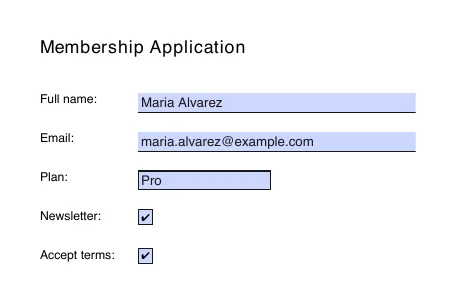
application.pdf is a fillable form in this folder. Fill it in for Maria Alvarez, email maria.alvarez@example.com, plan Pro, newsletter yes, and accept the terms. Save the result as application-filled.pdf and make sure the values actually show when the PDF is opened in a normal viewer.
| With skill | Without skill | |
|---|---|---|
| Skill used by Claude | Yes, on its own (pdf-form) | Not installed |
| Effort | 11 agent turns, 39 s, about $0.34 of usage | 15 agent turns, 74 s, about $0.40 of usage |
| Field values read back | All 5 correct | All 5 correct |
We read the saved fields back with pypdf and rendered the page. The two rendered pages were pixel-identical, so we show one.
Caveats
- Our test PDFs were text-based and easy. We did not test scanned documents, encrypted files or large merges.
- One run per setting.
How we installed it for the test
We copied the skill folder into .claude/skills/ inside the test project and put a Python environment with the libraries above on the PATH.