Claude XLSX Skill: Tested Review
The xlsx skill is for opening, fixing and creating spreadsheets. We gave Claude a deliberately messy CSV and checked the finished file against totals we calculated ourselves.
- Source
- anthropics/skills, folder skills/xlsx
- Source commit tested
- e4bb5d9
- Tested on
- 2026-11-16 with Claude Code 2.1.325
- Runs
- One run with the skill, one without
Our verdict
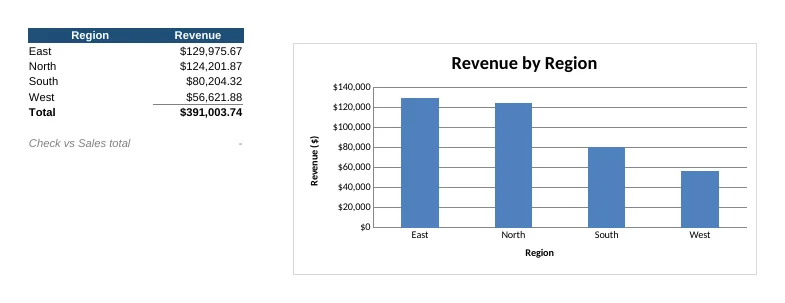
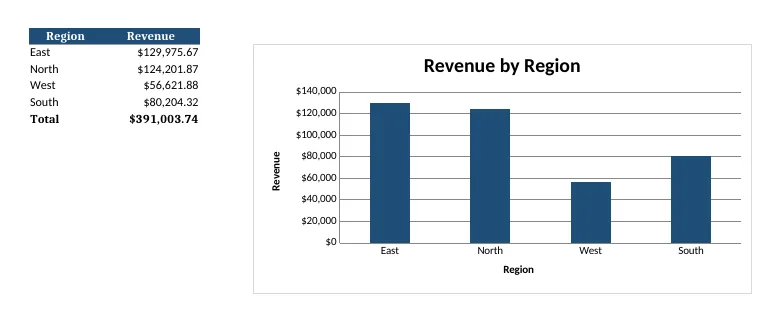
Both spreadsheets were correct: 24 clean rows, a total of 391,003.74 and matching region totals. The skill version added a reconciliation row that checks the two sheets agree. It also needed more than twice the turns and about 70 percent more time in this test.
What it says it does
Use this skill any time a spreadsheet file is the primary input or output. This means any task where the user wants to: open, read, edit, or fix an existing .xlsx, .xlsm, .xltx, .csv, or .tsv file; create a new spreadsheet from scratch or from other data sources; or convert between tabular file formats.
From the skill's own SKILL.md description, source: anthropics/skills at commit e4bb5d9.
What you need before it works
- Python with openpyxl and pandas. A plain Mac or Linux machine does not have these installed. We installed them before testing.
- LibreOffice, because the skill says recalculating formulas with its recalc.py script is mandatory. LibreOffice is a large download, and it is not installed on a plain Mac.
Real tests
Each test ran twice with the same prompt: once with the skill installed, once without. Single run each.
Clean a messy sales CSV and build a chart
Prompt we gave Claude
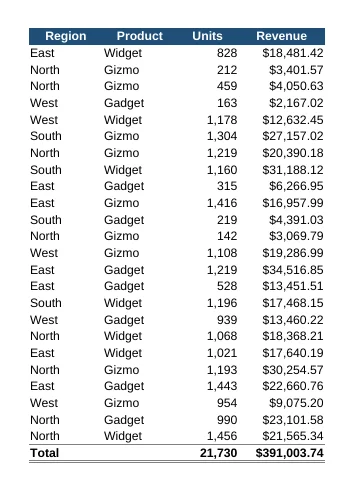
sales.csv in this folder is messy (blank rows, a repeated header, numbers stored as text like 1,200 and $1,234.56). Turn it into a clean sales.xlsx: a styled header row, Units and Revenue stored as real numbers, a Total row at the bottom that uses a SUM formula, and a bar chart of revenue by region on a second sheet using a formula-based summary. The formulas must have calculated values saved in the file, not just be formulas.
| With skill | Without skill | |
|---|---|---|
| Skill used by Claude | Yes, on its own (xlsx) | Not installed |
| Effort | 22 agent turns, 105 s, about $0.62 of usage | 9 agent turns, 61 s, about $0.32 of usage |
| Data rows | 24 (correct) | 24 (correct) |
| Total revenue | 391,003.74 (correct) | 391,003.74 (correct) |
| Formulas and chart | SUM and SUMIFS formulas, bar chart, plus a check row | SUM and SUMIF formulas, bar chart |
We opened both files with openpyxl and compared every number with totals we computed from the raw CSV. All matched. We then rendered both in LibreOffice for the screenshots.
Caveats
- In our sandbox LibreOffice could not start. Both runs therefore saved calculated values by computing them in Python, so the skill's mandatory recalculation step was not exercised. Claude said so in both runs.
- The screenshots come from copies set to fit one page, because the default print layout split the chart across pages. The original files were not changed.
- One run per setting.
How we installed it for the test
We copied the skill folder into .claude/skills/xlsx inside the test project, with the Python libraries available on the PATH.